How I Deploy Production Next.js + FastAPI Apps on a VPS
For OutCallerAI, I wanted the convenience of a platform like Vercel or Heroku without splitting every service across a different provider. The product is not only a Next.js application. It also has a FastAPI API, scheduled and asynchronous Prefect workloads, and PostgreSQL. I wanted one place to deploy and operate all of it, while keeping the database managed and keeping builds away from the production server.
The result is a simple rule: a merge to main should be enough to ship production.
GitHub Actions builds our containers on GitHub-hosted runners, GitHub Container Registry (GHCR) stores the resulting artifacts, and Dokploy pulls those pre-built images onto a DigitalOcean Droplet. Dokploy then takes care of running the services, while its bundled Traefik proxy sends each public hostname to the correct container.
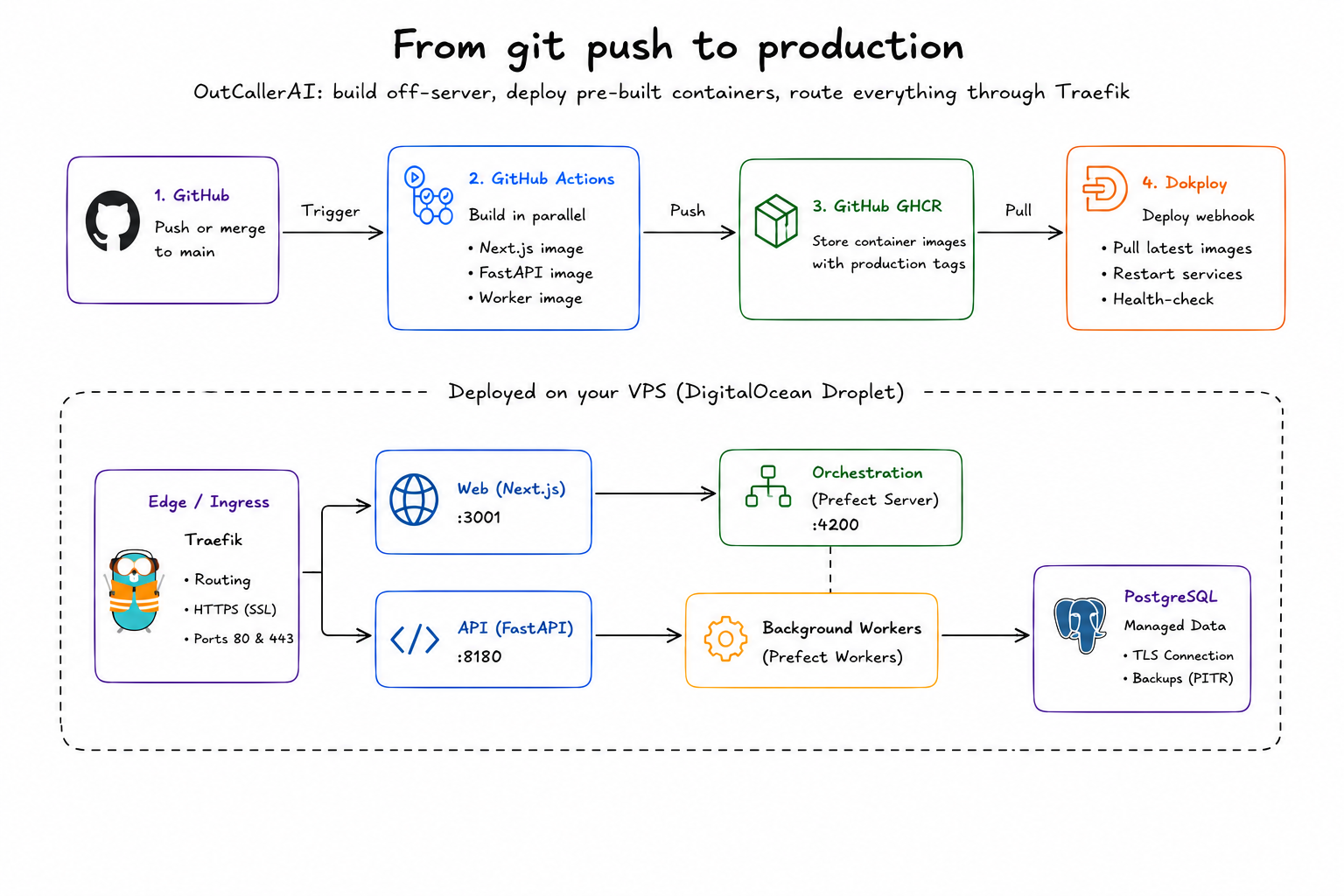
The Stack at a Glance
The production system has a few deliberately separate responsibilities:
| Layer | Technology | Responsibility |
|---|---|---|
| Source and CI | GitHub + GitHub Actions | Test the ref, build images, publish artifacts, trigger deployment |
| Image registry | GHCR | Store versioned Next.js, FastAPI, and Prefect worker images |
| Compute | DigitalOcean Droplet | Run Dokploy, Docker, Traefik, and application containers |
| Application platform | Dokploy | Configure, deploy, restart, monitor, and inspect services |
| Edge routing | Traefik | Terminate HTTPS and route hostnames to container ports |
| Web | Next.js | Serve the public site, dashboard, admin interface, and docs |
| API | FastAPI | Serve application APIs and run database migrations at startup |
| Workflows | Prefect server + workers | Schedule, coordinate, and execute background flows |
| Data | DigitalOcean Managed PostgreSQL | Keep production data outside the application Droplet |
This boundary is important. The Droplet is replaceable compute; PostgreSQL is a managed stateful service. A broken application deployment should not put the primary database volume at risk.
What Happens After a Push to main
The entire production path lives in a GitHub Actions workflow. It can also be started manually, and release tags use the same image-building path.
git push / merge to main
        ↓
GitHub Actions resolves production configuration
        ↓
Build web, API, and worker images in parallel
        ↓
Push immutable and moving tags to GHCR
        ↓
Call Dokploy deployment webhooks
        ↓
Dokploy pulls the production images and restarts services
        ↓
Traefik continues routing HTTPS traffic to the live containers
The build matrix produces three artifacts:
ghcr.io/<org>/outcallerai-web:main-<commit-sha>
ghcr.io/<org>/outcallerai-api:main-<commit-sha>
ghcr.io/<org>/outcallerai-worker:main-<commit-sha>
Each image also receives the moving production tag. The commit-based tag is an immutable record of exactly what was built; the moving tag gives Dokploy a stable image reference to pull for the current release.
Only after all three builds succeed does the deployment job call the Dokploy webhooks. If a build fails, production is never asked to redeploy. GitHub's concurrency setting also cancels an older in-progress run when a newer commit arrives on the same ref, preventing obsolete releases from racing the latest one.
Why Nothing Builds on the Production Server
Many self-hosted deployments clone the repository and run docker build directly on the VPS. That works, but it makes production responsible for two jobs: building software and serving traffic.
OutCallerAI uses a registry-first pipeline instead:
- GitHub Actions checks out the exact commit.
- Docker Buildx builds each multi-stage image.
- BuildKit reuses GitHub Actions and registry caches.
- The completed images are pushed to GHCR.
- Dokploy only needs to authenticate, pull the image, and start it.
This gives us several practical advantages:
- Deployments use fewer CPU and memory resources on the Droplet.
- A slow JavaScript or Python dependency build does not compete with production traffic.
- Every deployment starts from an artifact already produced by CI.
- The image digest and commit tag make releases traceable.
- A failed build fails before the production host is touched.
- The same image can be promoted or rolled back without rebuilding it differently.
It also means the Dockerfiles are part of the product. They define a reproducible runtime rather than acting as server-specific setup scripts.
How the Next.js Image Is Built
The web Dockerfile is a multi-stage build. The dependency stage installs the locked pnpm graph, the builder stage compiles Next.js, and the final stage contains only the standalone production output and static assets.
The NEXT_PUBLIC_* variables are passed as Docker build arguments because Next.js bakes public values into the browser bundle. Runtime secrets are not treated this way; values such as database credentials, JWT secrets, and private API keys belong in Dokploy's runtime environment configuration.
The final container runs as a non-root user and exposes a health endpoint. Dokploy and Docker can use that health signal instead of assuming that a running process is necessarily a working application.
One Next.js container can serve several hostnames. Traefik forwards the original Host header, and Next.js uses it to distinguish the public site, dashboard, admin interface, and documentation. We do not need four copies of the same web image just to support four subdomains.
How the FastAPI API Is Deployed
The API has its own multi-stage Python image. The builder installs dependencies from the locked uv environment and generates the Prisma client. The runtime stage copies the prepared virtual environment and application code, then starts Uvicorn on the API's internal port.
The API entrypoint runs database migrations before starting Uvicorn. Only the API owns that step. This avoids having multiple worker containers racing to apply the same migration during a rollout.
The database connection string is a runtime secret configured in Dokploy. It points to DigitalOcean Managed PostgreSQL with TLS enabled; it is never baked into the image or committed to the repository.
How Prefect Fits Into the Same Platform
Prefect is split into a control plane and execution processes:
- The self-hosted Prefect server exposes the API and UI used to coordinate deployments and flow runs.
- Prefect workers poll work pools and execute the flows assigned to them.
- Different pools isolate different kinds of work, such as scheduled calling, reminders, transcription recovery, knowledge-base syncs, reports, and escalations.
All workers use the same outcallerai-worker image. Dokploy creates several services from that one artifact and changes the startup command or pool name for each service. This is a useful container pattern: build the code once, run it in multiple operational roles.
The worker image includes the Prefect flow definitions and worker dependencies, but it does not expose a public HTTP port and does not run database migrations. Workers communicate with the Prefect server internally and connect to managed PostgreSQL when their flows need application data.
Prefect's work-pool model is a good fit here because deployments target a pool while workers provide the execution capacity. Adding capacity or separating a noisy workload can be as simple as adding another worker service in Dokploy with the appropriate pool.
Why PostgreSQL Is Managed, Not Another Container
It is tempting to put PostgreSQL on the same Droplet because Dokploy can run databases too. For production application data, I prefer a different failure boundary.
DigitalOcean Managed PostgreSQL provides automated operations that I do not want the application VPS to own: encrypted connections, maintenance, metrics, daily backups with point-in-time recovery, automated failover, and the option to add standby or read-only nodes. DigitalOcean documents the exact availability of these features in its Managed Databases overview.
That choice costs more than a local PostgreSQL container, but it reduces the operational blast radius. Rebuilding or resizing the Droplet does not move the database. A full application disk does not consume the database disk. Database restore and scaling are managed independently of Dokploy.
There is still work to do correctly: restrict trusted sources, use TLS verification where supported, keep credentials in Dokploy, configure clients to reconnect across brief maintenance or failover events, and test restores. “Managed” removes undifferentiated maintenance; it does not remove application-level responsibility.
DNS, Traefik, and HTTPS
Traefik is the single public entry point on the Droplet. It listens on ports 80 and 443 and routes requests by hostname:
app.example.com      → Next.js container
api.example.com      → FastAPI container
prefect.example.com  → Prefect server container
status.example.com   → monitoring container
There is one detail that is easy to describe incorrectly: Traefik does not create public DNS records for us. DNS records are created at the DNS provider and point each hostname to the Droplet's IP address. Inside Dokploy, we attach that hostname to a service and select its internal container port.
Dokploy then generates the Traefik router and service configuration. With HTTPS enabled, the route uses a certificate resolver such as Let's Encrypt. For standard Dokploy applications, domain configuration is hot-reloaded by Traefik without rebuilding the application. The Dokploy domain documentation shows the generated host rule, load balancer target, HTTPS entry point, and certificate resolver.
The container port used by a Dokploy domain is an internal routing destination, not a host port exposed directly to the internet. That lets the web and API remain behind Traefik while only the proxy owns the public edge.
Why Dokploy Works Well on a VPS
Dokploy gives us a useful middle ground between raw Docker commands and a fully managed platform:
- One control panel: deployments, environment variables, logs, resource graphs, domains, and service state live together.
- Bring any Docker image: an application can come from a repository, Dockerfile, Compose file, or registry image.
- Webhook-driven CD: GitHub Actions can trigger a deployment only after artifacts are ready.
- Registry integration: private GHCR credentials are configured once and reused.
- Automatic routing: adding a hostname generates the Traefik configuration instead of requiring hand-written proxy files.
- Operational controls: restart, stop, inspect logs, set resource limits, attach volumes, and review recent deployments from the UI.
- Rollback options: Dokploy supports health-check-based Docker Swarm rollback and registry-based rollback to a stored deployment image. See the rollback documentation.
- Portability: the core artifact remains a Docker image. We are not packaging the application in a proprietary format.
The biggest benefit is not that Dokploy makes infrastructure disappear. It makes the common operations visible and repeatable without preventing us from dropping down to Docker, Traefik, or the server when needed.
Adding Another Project or Self-Hosted Tool
Once the Droplet, Dokploy, registry, and DNS pattern exist, adding a project is pleasantly repetitive:
- Create a project and application in Dokploy.
- Select a Git repository, Dockerfile, Compose file, or pre-built registry image.
- Configure runtime environment variables and registry credentials.
- Add a domain and select the container's internal port.
- Point the DNS record to the Droplet.
- Deploy and verify the health check, HTTPS certificate, and logs.
- If CI builds the image, add the Dokploy deployment webhook as a GitHub secret and call it after the image-publish job.
For common self-hosted software, even that can be shortened. Dokploy maintains a library of 390+ pre-configured templates covering databases, analytics, CMSs, developer tools, and other open-source services. A template is not a reason to skip reviewing volumes, credentials, backups, and exposure, but it removes a lot of initial Compose wiring.
This makes the same VPS useful beyond the primary product. Internal tools, status pages, analytics, webhook utilities, and experiments can live as separate Dokploy projects with their own domains and environment variables. Resource limits and isolation still matter because a single VPS remains a shared failure domain, but the setup cost for each new service becomes much smaller.
Tradeoffs I Would Keep in Mind
This architecture is intentionally pragmatic, not infinitely scalable.
- The Droplet is still a compute failure domain for the services running on it.
- Dokploy, Docker, and the host operating system still need updates and backups.
- A moving
productiontag is convenient, but immutable tags and digests should remain available for audit and rollback. - Deploy webhooks should be secrets, and deployment permissions should be tightly scoped.
- Public admin tools such as Prefect should be protected with authentication or an access layer, not merely an obscure hostname.
- Health checks need to test meaningful readiness, not only whether a port accepts connections.
- Shared worker images reduce build duplication, but each pool still needs sensible concurrency and resource limits.
- The registry, GitHub Actions, DNS provider, Droplet, and managed database are external dependencies. The simplicity comes from clear boundaries, not from having no dependencies.
If the product outgrows one host, the pre-built-image approach gives us a good migration path. The CI artifacts can be deployed to a larger Dokploy cluster or another container orchestrator without redesigning the application build.
The Part I Like Most
The final workflow is easy to explain to the team:
Merge to
main. GitHub builds the release. GHCR stores it. Dokploy pulls it. Traefik routes it.
That sentence hides a lot of careful setup, including multi-stage images, secret boundaries, health checks, migrations, worker pools, DNS, TLS, and managed data. Even so, it gives day-to-day development a very small surface area.
For a product made of Next.js, FastAPI, and Prefect, Dokploy on a DigitalOcean Droplet has been a strong balance of cost, control, and developer experience. We keep the flexibility of containers, avoid builds on the production server, and get a platform-like deployment workflow from infrastructure we can still understand and operate ourselves.