8 Mac Apps That Make Your Dev and AI Workflow Feel Twice as Fast
On this page+
Apple Silicon compiles fast. Most of the slowdown in a developer's day happens in the small gaps around the code: pasting a multi-line curl snippet that executes halfway, hitting EADDRINUSE on port 3000 again, or running out of Claude or Codex quota in the middle of a refactor because you never checked the browser dashboard.
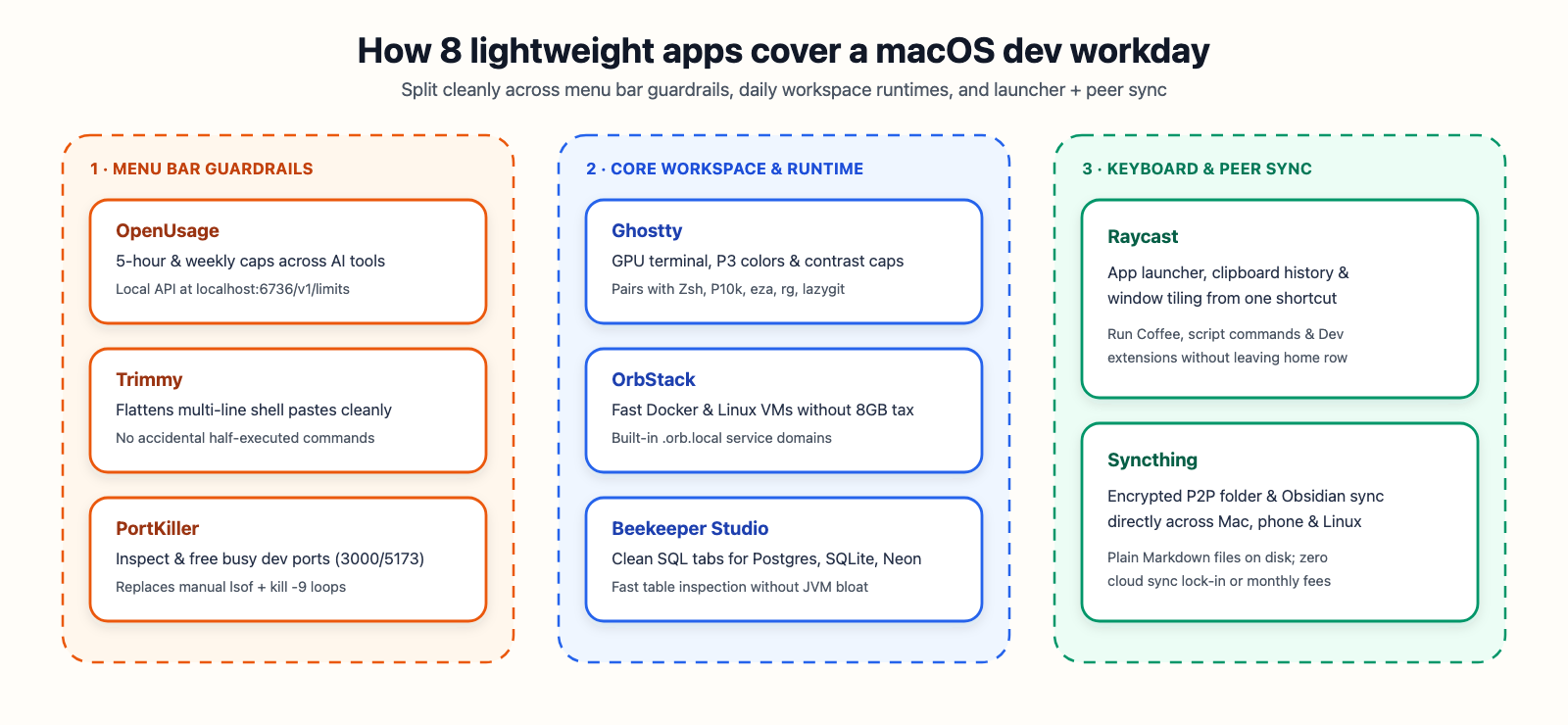
None of the apps below add visual clutter. Each one deletes a real annoyance I kept running into while building locally and running multiple coding agents.
(For everyday macOS fixes outside dev tooling—mouse acceleration, camera previews, meeting transcription, and LAN file transfers—see Part 2: 8 Underrated Mac Utilities That Quietly Fix Apple's Weirdest Defaults.)
1. OpenUsage — Track AI Quotas Before Mid-Task Throttling
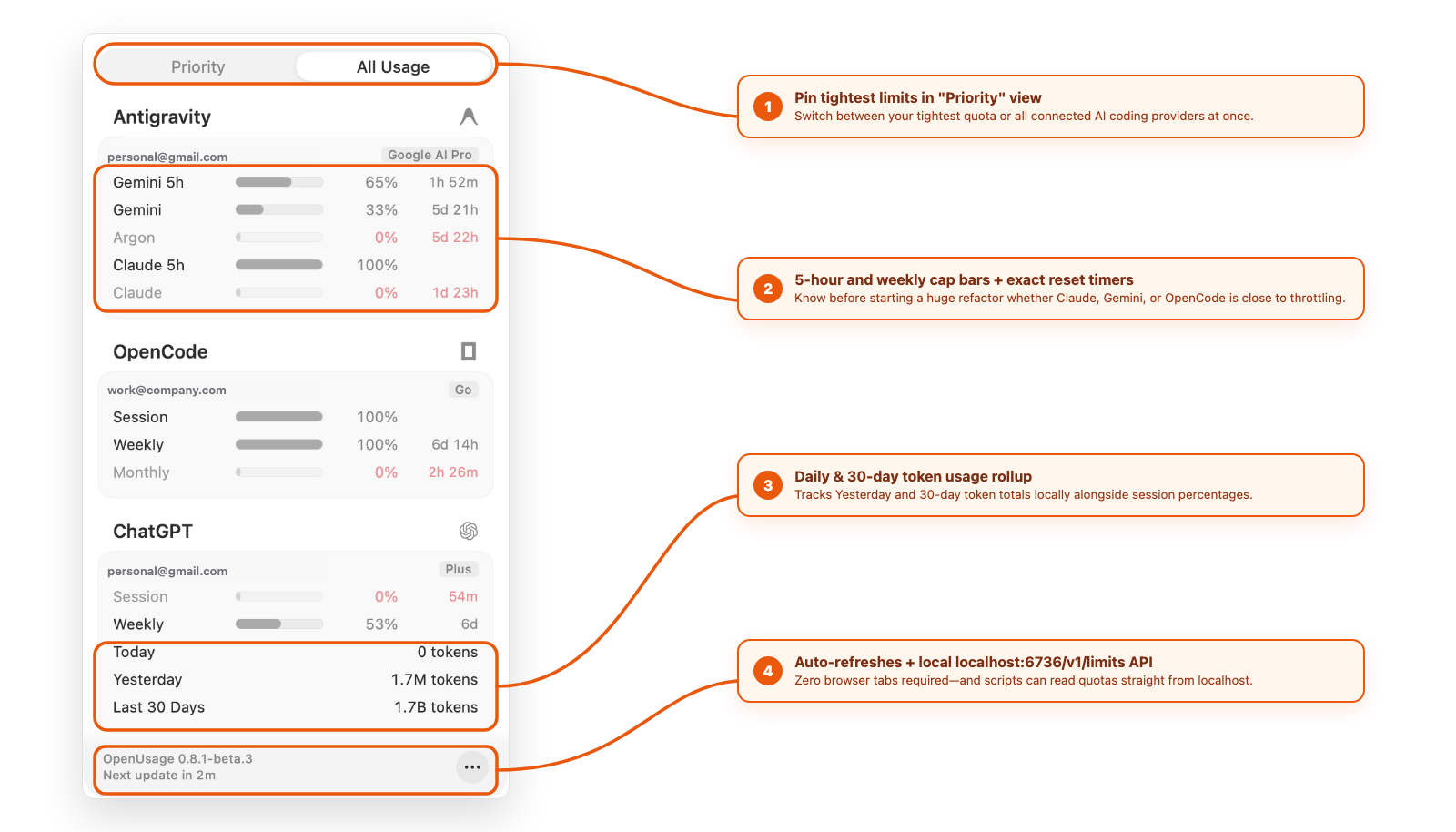
If you rotate between Claude, Codex, Cursor, Copilot, OpenRouter, or Antigravity subscriptions, running into a 5-hour or weekly cap mid-branch wastes momentum fast.
OpenUsage puts every provider's remaining percentage, reset countdown, and token totals in one menu bar popover. Pin whichever quota is tightest in Priority view, or query its local localhost:6736/v1/limits JSON endpoint from your own scripts.
brew install --cask openusage2. Trimmy — Clean Multi-Line Terminal Pastes Automatically
Docs, LLM replies, and README files constantly wrap shell commands across multiple lines with \ continuations and stray indentation. Pasting them raw into a shell often misfires halfway through.
Trimmy watches your clipboard from the menu bar and flattens multi-line shell snippets into one clean single-line command before you hit Cmd+V. You barely notice it is installed until you switch to a machine without it.
brew install --cask steipete/tap/trimmy3. PortKiller — Free Stuck Local Ports in One Click
Running Next.js, FastAPI, Postgres, and isolated git worktrees at the same time guarantees orphaned processes squatting on :3000, :5173, or :8080.
Instead of running lsof -i :3000 followed by kill -9 <PID> ten times a day, PortKiller surfaces listening ports, owning processes, and containers straight in the menu bar so you can clear a port in one click.
brew install --cask portkiller4. Ghostty — Native GPU Rendering Without Visual Mud
Switching to Ghostty feels noticeably snappier than Electron terminals, and its P3 color handling, minimum-contrast, and linear-corrected alpha blending keep dark transparent panes legible next to bright browser windows.
brew install --cask ghosttyI documented my full config—paired with Zsh, Powerlevel10k, eza, bat, ripgrep, fzf, zoxide, and lazygit—in Every Developer Should Set Up Their Terminal Like This.
5. OrbStack — Lightweight Docker and Linux VMs
Docker Desktop gets the job done until it quietly claims 8 GB of RAM and spins up fans on an unplugged laptop. OrbStack boots containers in seconds, sips battery at idle, and gives running services automatic .orb.local domains—handy when jumping between local Postgres, Redis, and Docker Compose stacks.
6. Syncthing — Peer-to-Peer Sync With Zero Cloud Lock-In
I keep 200+ Obsidian Markdown notes synchronized directly across devices using Syncthing. Files stay regular folders on disk and sync over encrypted device-to-device connections with no monthly storage subscription.
Full setup details and conflict tips are in How I Sync My Obsidian Notes Across Devices for Free Using Syncthing.
7. Beekeeper Studio — Clean SQL Client Without Heavy Java Bloat
When you just want to run a quick Postgres query, inspect a local SQLite database, or check rows in Neon without wrestling terminal column wrapping or waiting on a heavy database IDE, Beekeeper Studio opens quickly and keeps tabs, filters, and saved queries out of your way.
8. Raycast — Keyboard-First Launcher, Clipboard, and Window Snapping
Swapping Spotlight for Raycast eliminates dozens of trackpad trips a day. Clipboard history, window tiling hotkeys, and extensions—including the Coffee extension if you want keyboard-triggered caffeinate rules without installing another menu bar app—keep everything one shortcut away.
Keep Storage and Sleep Hygiene Covered Too
If multi-worktree agent runs are eating disk space on Apple Silicon or putting your Mac to sleep mid-build, these two companion notes cover the system side: