Stop Overpaying for GitHub Actions: Self-Host Your CI With Woodpecker
On this page+
Once a private monorepo starts getting daily pull requests—alongside linters, OpenAPI schema checks, Node and Python SDK tests, and three multi-stage Docker builds on every merge—GitHub Actions stops feeling "essentially free."
Private runner minutes disappear quickly, queued jobs slow down PR reviews, and every merge to main burns billing minutes rebuilding containers that could be built right on your own hardware.
Earlier, I documented our zero-build-on-server Dokploy pipeline, where GitHub Actions built Docker images and pushed them to GHCR. Once CI volume picked up on OutCallerAI, we moved heavy checks and image builds onto self-hosted Woodpecker CI running on our own VPS.
Instead of forcing every workflow off GitHub, we split the pipeline down the middle so both systems do what they are good at.
The Hybrid Split: Woodpecker CI vs. GitHub Actions
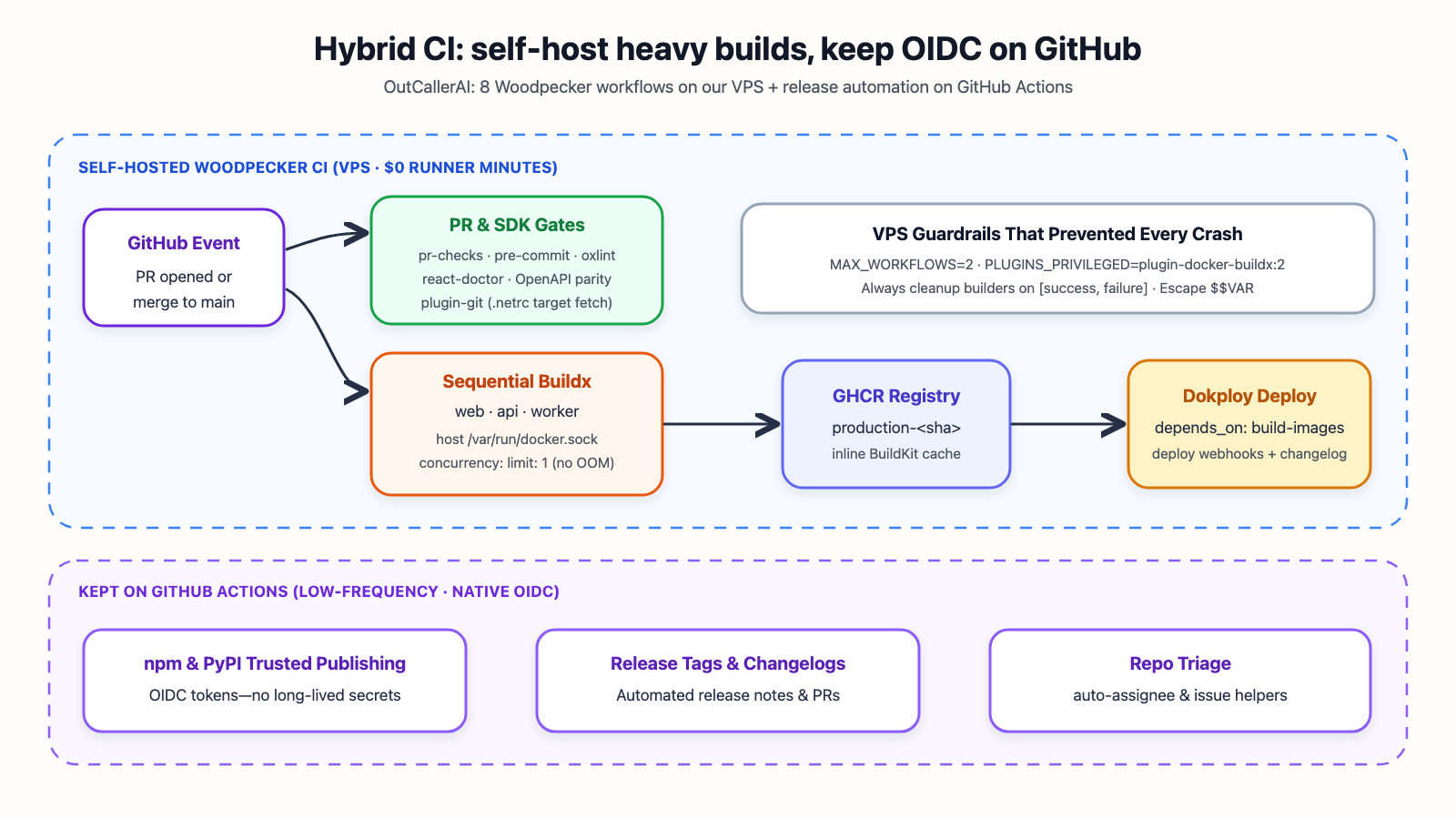
Trying to move 100% of release automation off GitHub usually hurts when you give up OIDC trusted publishing and GitHub release permissions. Keeping release workflows on GitHub while offloading high-frequency builds to Woodpecker gives you zero minute metering without losing OIDC tokens:
| Workload | Runner | Reason |
|---|---|---|
PR lint (pre-commit, oxlint, react-doctor, commitlint) | Woodpecker CI | Runs on every commit; local VPS cache keeps feedback fast |
Backend contract & OpenAPI tests (pgvector) | Woodpecker CI | Multi-service Python + Postgres tests without minute multipliers |
| Node & Python SDK packed-consumer checks | Woodpecker CI | Runs matrix checks without burning cloud credits |
| Web, API, and Worker Docker builds -> GHCR | Woodpecker CI | Uses host /var/run/docker.sock and registry cache directly |
| Dokploy production deploy webhooks | Woodpecker CI | Runs via depends_on: [build-images] once images finish pushing |
| npm / PyPI trusted publishing (OIDC) & release tags | GitHub Actions | Low-frequency release tasks that rely cleanly on native GitHub OIDC |
High-frequency checks and image builds run on your VPS; low-frequency release publishing stays on GitHub.
How .woodpecker/ Is Laid Out
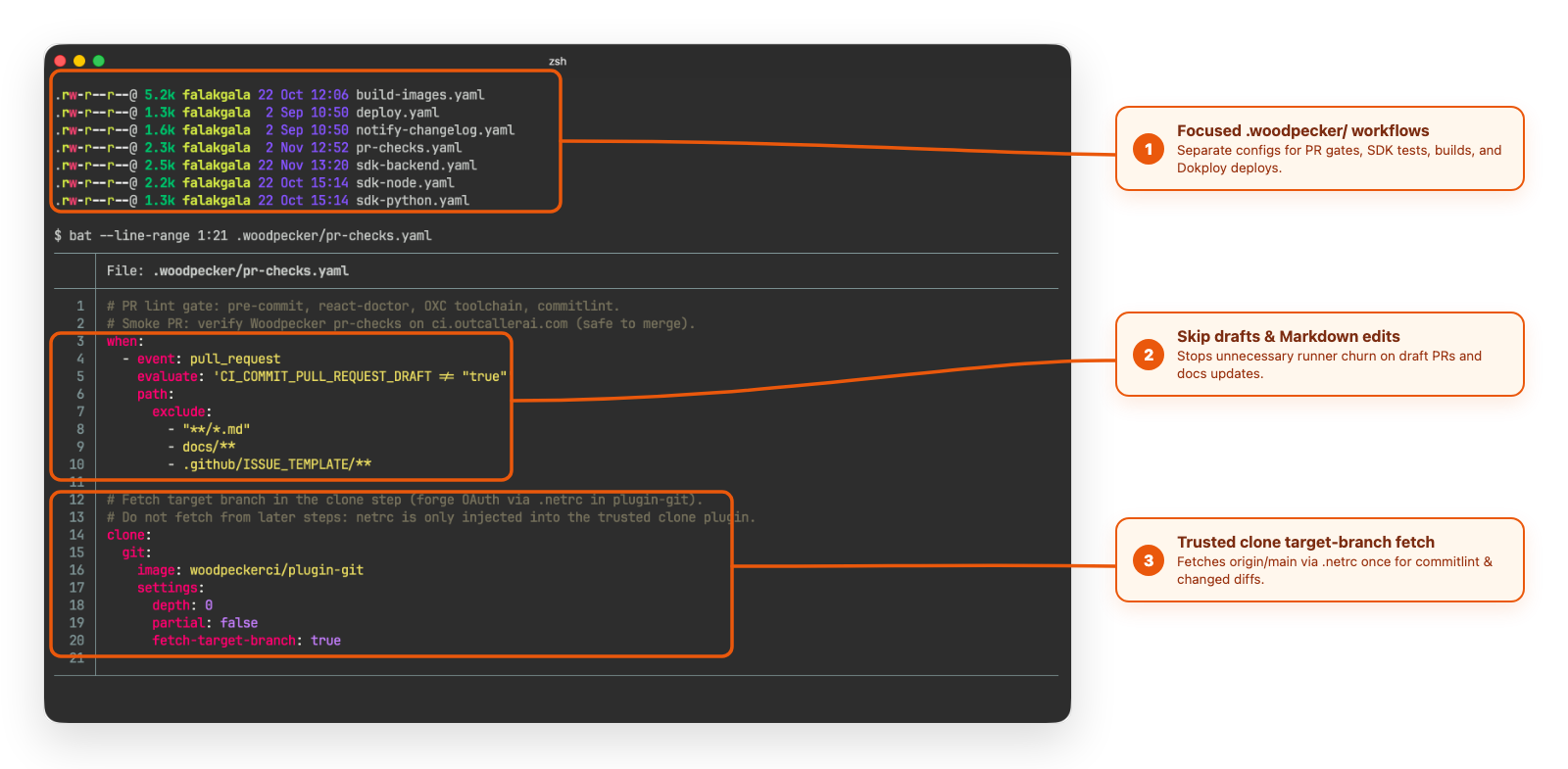
We keep eight targeted workflow files inside .woodpecker/ (bootstrap-ci-image.yaml, pr-checks.yaml, sdk-backend.yaml, sdk-node.yaml, sdk-python.yaml, build-images.yaml, deploy.yaml, and notify-changelog.yaml):
Pull request opens or updates
pr-checks.yaml, sdk-backend.yaml, sdk-node.yaml, and sdk-python.yaml run in parallel using path filters so docs-only edits never spin containers up.
Merge to main builds images sequentially
build-images.yaml builds outcallerai-web, outcallerai-api, and outcallerai-worker one at a time via woodpeckerci/plugin-docker-buildx:2 and pushes production-<sha> and production tags to GHCR.
Deploy webhooks fire after green builds
deploy.yaml waits on build-images (depends_on), hits the Dokploy webhook for changed services, and notify-changelog.yaml handles release notes on merge.
Five VPS Gotchas We Hit in Production
Spinning up Woodpecker with Docker Compose takes ten minutes. Running monorepo PR gates and multi-stage Docker builds reliably on a single VPS required fixing five issues that rarely show up in getting-started guides.
1. Skip Nested DinD and Mount the Host Socket
Nested Docker-in-Docker regularly breaks on VPS kernels when overlay filesystems fail inside containers. Mount /var/run/docker.sock into the Woodpecker agent and pass PLUGIN_DAEMON_OFF: "true" to plugin-docker-buildx.
In Woodpecker 3.x, allowlist the privileged Buildx plugin on the server too:
WOODPECKER_PLUGINS_PRIVILEGED=woodpeckerci/plugin-docker-buildx:2Then enable Trusted (Volumes + Security) in the repository's Woodpecker settings.
2. Clean Up Ephemeral Buildx Builders (Even After SIGKILL)
Sharing /var/run/docker.sock means failed or cancelled pipelines can leave stale Buildx builder containers running—and you cannot casually docker system prune a host daemon that also runs Dokploy.
Store builder state inside $CI_WORKSPACE and attach a cleanup step using status: [success, failure]:
  - name: cleanup-builders
    image: woodpeckerci/plugin-docker-buildx:2
    privileged: true
    volumes:
      - /var/run/docker.sock:/var/run/docker.sock
    commands:
      - |
        result=0
        for step in web api worker; do
          sh scripts/ci/buildx-lifecycle.sh cleanup "$${step}" || result=1
        done
        exit "$${result}"
    when:
      - status: [success, failure]
(Write shell variables inside commands as $${VAR}—Woodpecker expands single ${VAR} syntax before the shell runs.)
3. Cap Agent Concurrency Before the Linux OOM Killer Hits (137)
If three heavy Next.js / Python builds launch concurrently on a modest VPS, the kernel OOM-kills a container mid-step and Woodpecker reports cryptic errors like:
agent can not append logs to a step that is marked not runningTwo settings eliminated exit 137 crashes across our builds:
- Cap the agent at
WOODPECKER_MAX_WORKFLOWS=2with swap enabled on the host. - Serialize Docker image builds with a
concurrencygroup:
concurrency:
  limit: 1
  group: image-build
4. Fetch the Target Branch in clone, Not With a Registry PAT
Checks like commitlint and react-doctor --scope changed --base origin/main need origin/main present locally. Running ad-hoc git fetch commands inside later build steps with a personal token makes auth fragile.
Configure woodpeckerci/plugin-git in the clone block so Woodpecker handles OAuth via .netrc once up front:
clone:
  git:
    image: woodpeckerci/plugin-git
    settings:
      depth: 0
      partial: false
      fetch-target-branch: true
Keep ghcr_username (your GitHub username, not org slug) and ghcr_token (write:packages + read:packages) scoped strictly to pushing images.
5. Watch Comma Parsing on PLUGIN_SECRETS in plugin-docker-buildx
When a step invokes Buildx through commands: instead of settings:, plugin configuration passes via PLUGIN_* environment variables. Do not include ,env=KEY inside PLUGIN_SECRETS:
      PLUGIN_BUILD_ARGS_FROM_ENV: NEXT_PUBLIC_API_URL,NEXT_PUBLIC_APP_ENV
      # BuildKit reads the env var named by `id`; `env=` breaks comma splitting in the plugin.
      PLUGIN_SECRETS: id=POSTHOG_PERSONAL_API_KEY
Leaving env= out fixes silent secret/sourcemap build failures because plugin-docker-buildx splits PLUGIN_SECRETS strictly on commas.
When Self-Hosting Woodpecker Makes Sense
If your repo only runs a two-minute lint check a few times a week, stay on GitHub Actions' free tier—zero server maintenance wins.
Once your stack runs multi-container database checks, SDK matrices, and multi-image Docker pushes on every merge, running Woodpecker CI on a $10–$20 VPS removes runner-minute bills and keeps local caches warm across builds.
Related reads on this stack: Zero-Build Deployments With Dokploy, GitHub Actions, and GHCR, Every Developer Should Set Up Their Terminal Like This, and 8 Mac Apps for Dev and AI Workflows.